

Nothing stops a coil processing shift faster than watching your main operator pulpit suddenly trigger an HMI communication error across every single point on the screen—leaving operators staring at dozens of fault dots with no clue where to begin.
Recently, our slitting line crew ran into this exact nightmare. Out of nowhere, the touchscreen display on our main operator desk (CD-2) lit up with status fault indicators on every single machine point at the same time. Staring at a full-screen HMI communication error where every interlock dot had flipped simultaneously, the entire floor team assumed a major cable had snapped or a PLC module had failed.
We spent two full hours tracing field cables line-by-line across the slitting floor before finding the real culprit: a single loose power wire at the bottom of an Ethernet switch inside the panel room. Here is the exact diagnostic trail so you never lose two hours to the same hidden fault.
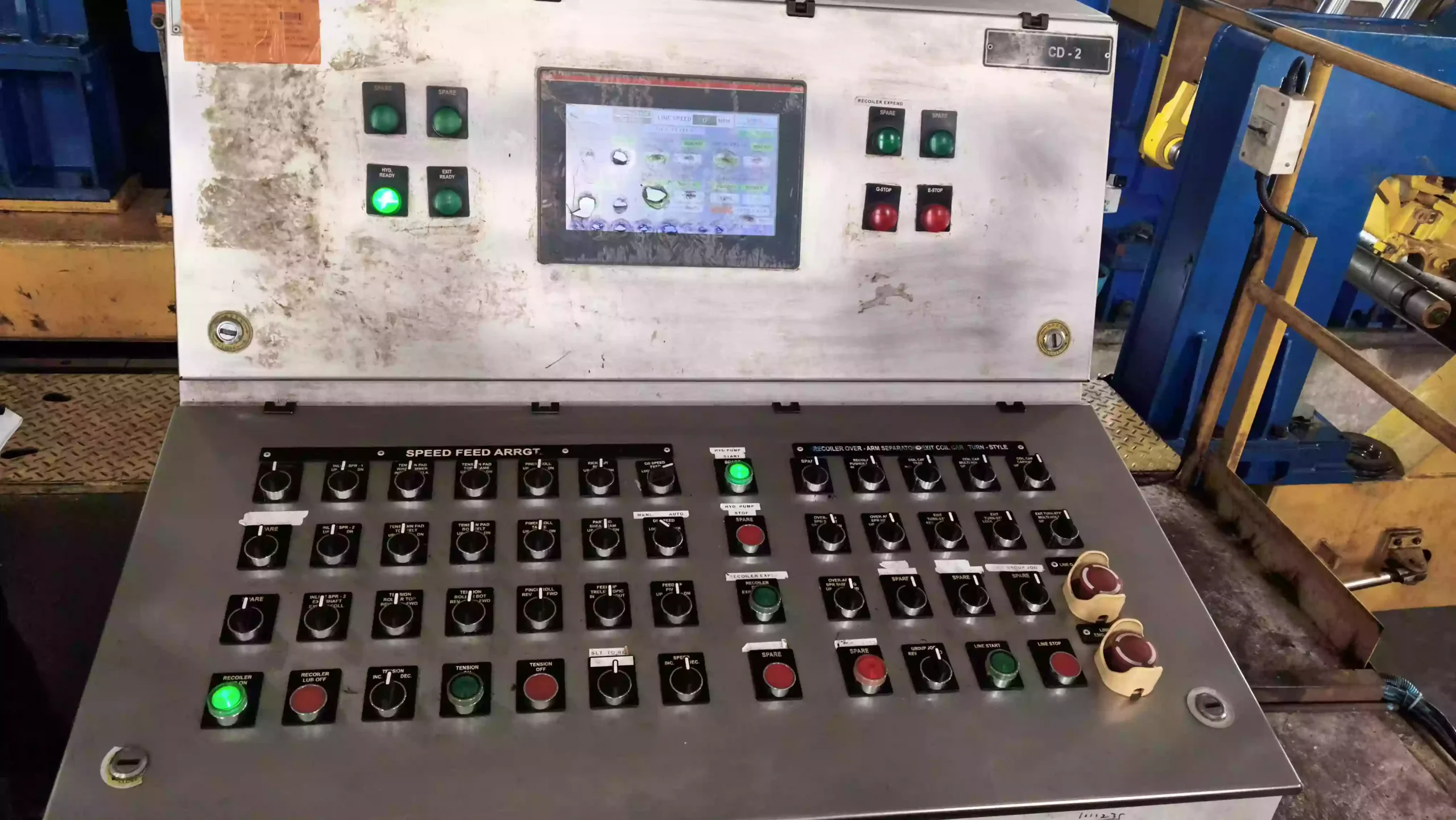
Why Does a Sudden HMI Communication Error Hit Every Screen Point at Once?
When you troubleshoot a machine breakdown, understanding what separates a localized sensor fault from a global HMI communication error saves hours of wasted labor.
On a modern coil slitting line, the operator desk HMI does not wire directly to every hydraulic valve or limit switch. Instead, field signals run back to the main PLC in the electrical control panel room, and the PLC talks to the operator desk over an Industrial Ethernet / PROFINET network:
-
Field Sensors & Actuators: Wired into remote I/O blocks and panel terminal strips.
-
Main PLC CPU: Processes all machine logic and safety interlocks.
-
Industrial Ethernet Switch (Hub): Connects the PLC, HMI screen, and drives together.
-
Operator Desk HMI: Reads live status tags from the PLC across that Ethernet link.
If one sensor fails, only one indicator changes on your screen. When every single point on the HMI goes into error simultaneously, the PLC hasn’t lost every sensor—the HMI has lost its data link to the PLC. (For field-level circuit faults, see our guide on Slitting Line Fuse Blowing Troubleshooting.)
4-Step Troubleshooting Guide for an HMI Communication Error
During our two-hour stoppage, our team initially checked field junction boxes and machine-side cables one by one without finding a single broken wire. Follow this faster top-down sequence whenever every point on your screen faults together:
Step 1: Rule Out Individual Field Wiring First
If dozens of unrelated points (uncoiler, slitter head, tensioner, recoiler) all show error dots at the exact same second, do not start tracing individual sensor cables on the shop floor.
A single broken field wire cannot knock out every screen tag across multiple machine sections simultaneously. Go straight to the central communication hardware inside the electrical control panel room.
Step 2: Inspect the Control Panel Ethernet Communication Switch
Walk into the control panel room where all network cables from the operator pulpit and drives converge. Locate your DIN-rail Industrial Ethernet Switch (on our line, a Phoenix Contact FL SWITCH 1000).
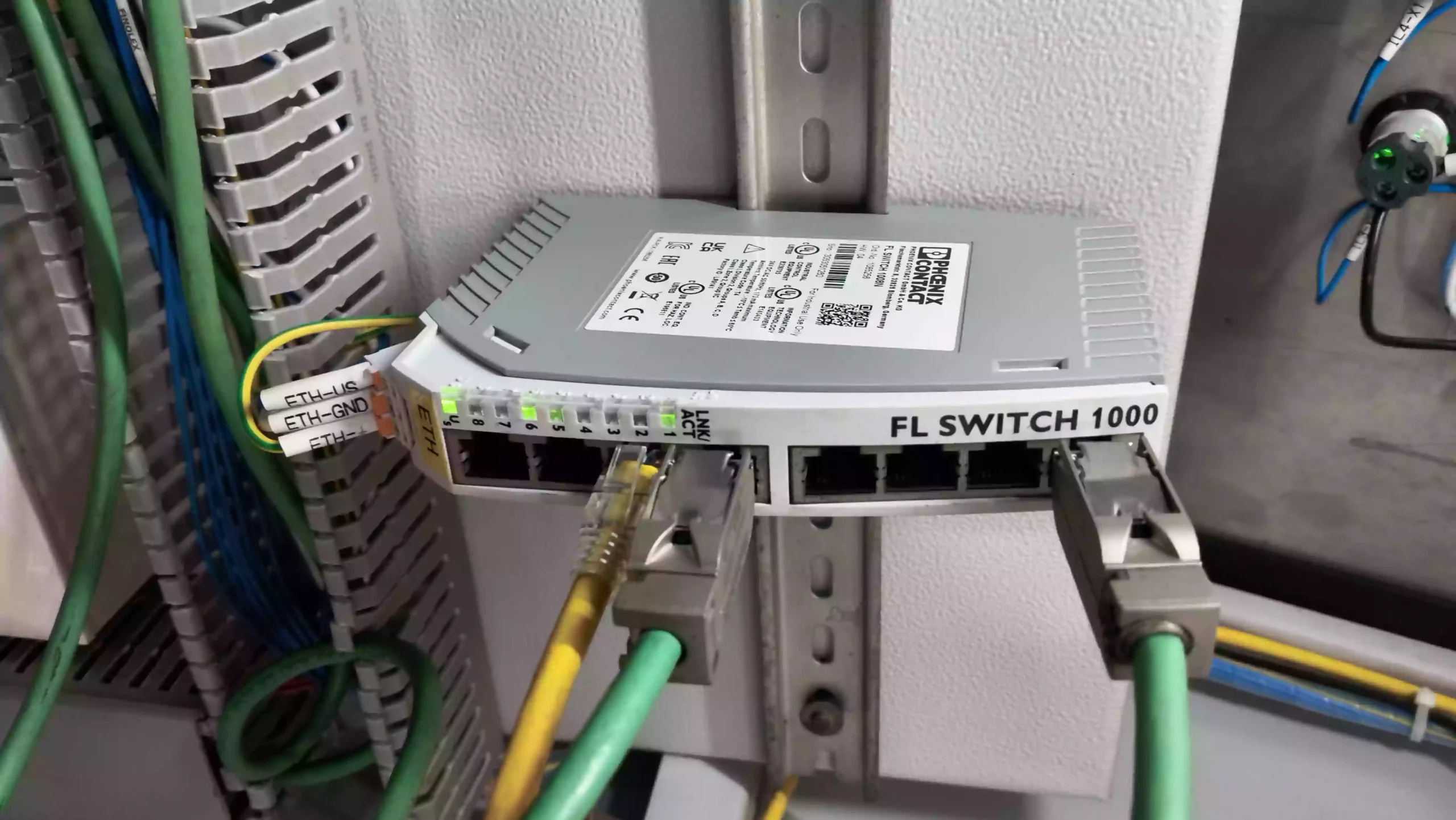
Check the status LEDs on the front face of the Ethernet switch immediately:
-
Power LED (
US/PWR): Must be glowing solid green. -
Port Link/Activity LEDs (
LNK/ACT): Should be blinking green on every plugged-in RJ45 cable port.
If all LEDs on the switch are completely dark—even though the RJ45 Ethernet plugs look firmly latched—the switch itself has lost power.
Step 3: Check the 3-Wire DC Power Connector Under the Switch
How to Spot a Loose Supply Wire During an HMI Communication Error
At the bottom edge of the Ethernet switch, inspect the 3-pin screw terminal power connector (labeled ETH-US for +24V DC, ETH-GND for 0V reference, and functional earth).
When I inspected our switch closely after tracing the network back to the panel room, the problem was staring right at me:
-
Three wires entered the bottom power plug to supply 24V DC to the hub.
-
The middle wire (
ETH-GND) had vibrated loose inside its screw clamp and backed out just enough to break electrical contact. -
Without that 0V ground connection, the Ethernet switch shut off completely—severing communication between the panel room and the operator desk HMI.
(Learn more about securing industrial DIN-rail Ethernet switch power wiring to prevent vibration-induced dropouts in steel processing plants.)
Step 4: Re-Seat and Tighten the Screw Terminal
Once we spotted the loose middle wire, the actual repair took less than 60 seconds:
-
Pushed the
ETH-GNDwire fully back into the center terminal slot of the plug. -
Tightened the terminal screw firmly with an insulated precision screwdriver and performed a gentle tug-test on all three wires.
-
Verified that the switch’s power and port LEDs lit up immediately.
-
Walked back to the operator desk—every single error dot on the HMI screen had cleared automatically without even needing a PLC reboot.
Quick Diagnostic Table: Field Fault vs. Communication Loss
| HMI Screen Symptom | Probable Root Cause | Where to Check First |
| 1 or 2 status dots turn red/fault | Specific field sensor, limit switch, or fuse | Check that specific machine zone or sensor |
| All points show error dots together | PLC-to-HMI Ethernet link dropped | Check panel room Ethernet switch power & LEDs |
| Ethernet switch LEDs completely off | Loose 24V DC / GND wire or tripped breaker | Inspect bottom power plug (US / GND) on switch |
| Switch power LED on, 1 port LED off | Damaged RJ45 plug or broken CAT5e/CAT6 cable | Reseat or swap that specific Ethernet patch cord |
Final Thoughts
Plant vibration inside a heavy-gauge coil slitting facility slowly loosens screw terminals over months of continuous running—especially on compact DIN-rail communication modules. Adding a quick terminal tug-test to your monthly panel inspection takes five minutes and prevents multi-hour ghost breakdowns.
The next time a sudden HMI communication error lights up every fault dot on your operator desk, walk straight to your control panel Ethernet switch before tracing a single field wire—have you ever lost hours of production to one tiny loose screw? Drop your experience in the comments below!